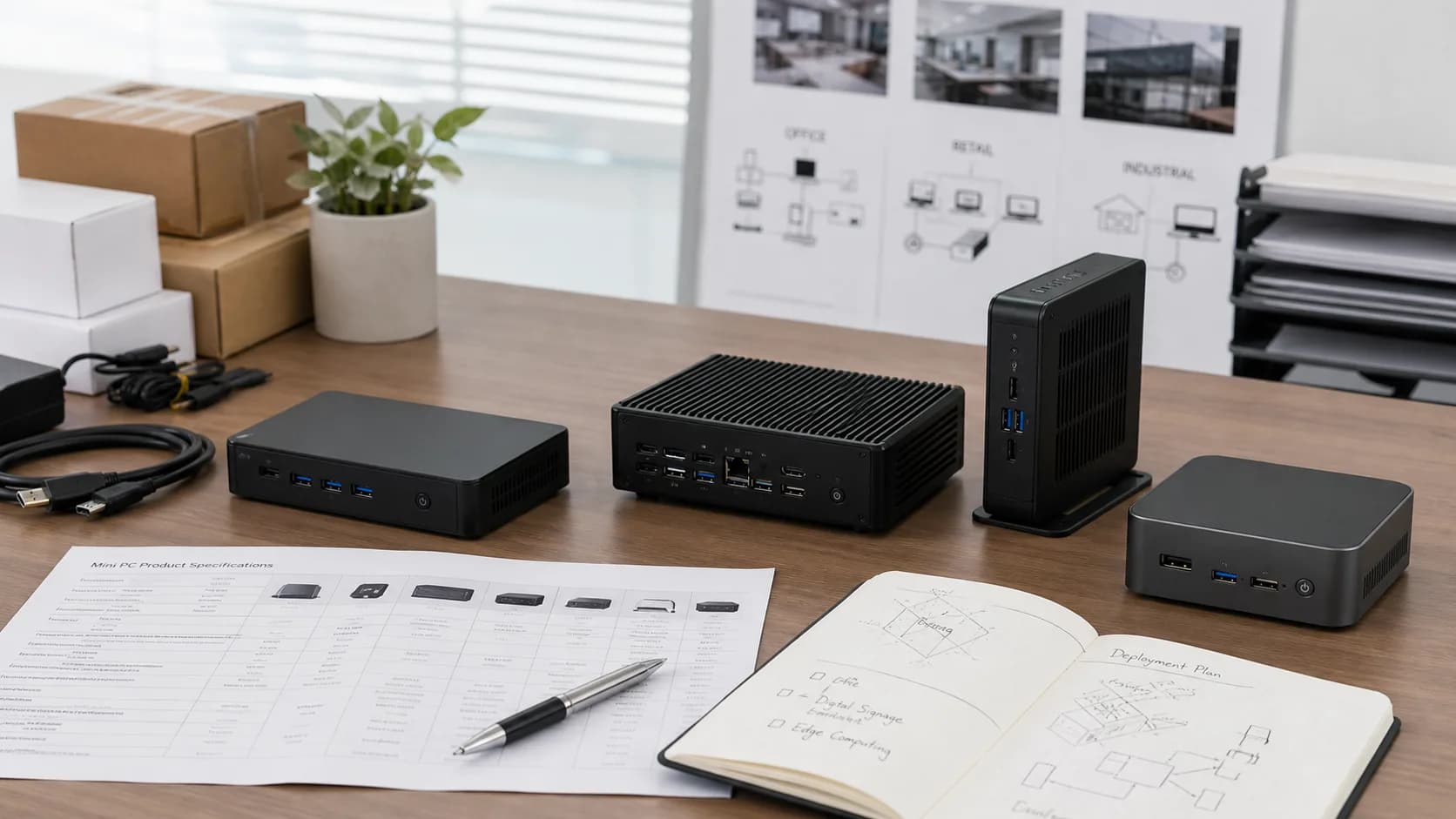
Last Updated: January 14, 2026 | Reading Time: 18 minutes | For: Distributors, System Integrators, Enterprise IT, Resellers
Introduction
Looking for the best mini PC for your business needs but overwhelmed by the options?
The mini PC market has exploded in recent years, with global shipments reaching 35 million units in 2024. For B2B buyers—whether you're a distributor sourcing inventory, an enterprise deploying workstations, or a system integrator building custom solutions—choosing the right mini PC and supplier is critical to your success.
This comprehensive guide covers everything you need to know about mini PC procurement in 2025: from understanding different form factors and specifications to navigating wholesale pricing, MOQ requirements, and customization options.
In this guide, you'll learn:
- Mini PC types, form factors, and ideal use cases
- How to evaluate specifications for different applications
- B2B wholesale pricing structures and MOQ expectations
- Customization options for branding and configuration
- How to select reliable mini PC manufacturers
- Enterprise deployment considerations and best practices
Reading time: 18 minutes | Audience: B2B Procurement, IT Managers, Distributors, System Integrators
Table of Contents
- What is a Mini PC?
- Mini PC Types and Form Factors
- Key Specifications Explained
- Best Mini PC Use Cases by Industry
- B2B Wholesale Pricing Guide
- Customization Options
- Choosing a Mini PC Manufacturer
- Enterprise Deployment Guide
- Mini PC vs Desktop: Business Comparison
- Frequently Asked Questions
What is a Mini PC? {#what-is-mini-pc}
A mini PC (also called a small form factor PC or compact desktop) is a fully functional computer in a significantly smaller chassis than traditional desktop towers. Typically measuring under 2 liters in volume, mini PCs deliver desktop-class performance while occupying minimal desk space.
Mini PC vs Traditional Desktop
| Feature | Mini PC | Traditional Desktop |
|---|---|---|
| Size | 0.5-2L volume | 15-40L volume |
| Weight | 0.3-1.5 kg | 5-15 kg |
| Power consumption | 15-65W typical | 200-500W typical |
| Upgradeability | Limited | Extensive |
| Portability | Easy to relocate | Stationary |
| Noise level | Quiet to silent | Moderate to loud |
| Price range | $150-$1,500 | $300-$3,000+ |
Why Mini PCs Are Gaining B2B Traction
1. Space Efficiency
- 90% smaller footprint than traditional desktops
- Ideal for space-constrained environments
- VESA mountable behind monitors
2. Energy Savings
- 60-80% lower power consumption
- Reduced cooling requirements
- Lower electricity costs at scale
3. Deployment Flexibility
- Easy to ship and install
- Quick replacement and rotation
- Suitable for distributed locations
4. Total Cost of Ownership
- Lower hardware costs
- Reduced energy bills
- Simplified logistics
For businesses deploying 100+ units, mini PCs can reduce total cost of ownership by 25-40% compared to traditional desktops.
Mini PC Types and Form Factors {#mini-pc-types}
Understanding mini PC categories helps you match products to specific use cases.
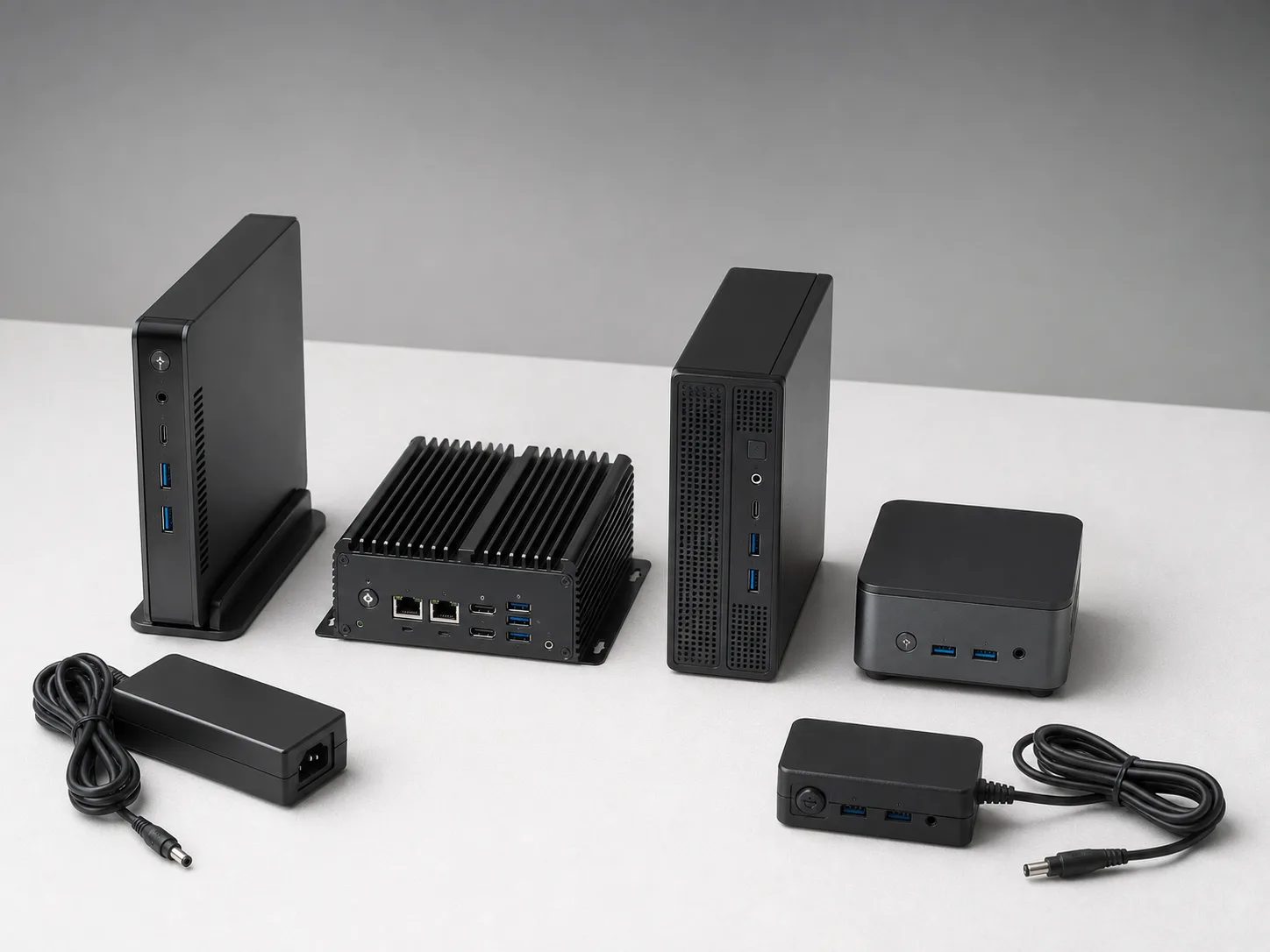
Form factor affects mounting, cooling, port layout, accessories, and long-term deployment planning.
By Size Category
Ultra-Compact (Under 0.5L)
Examples: Intel NUC, AIERXUAN DU Series
Characteristics:
- Smallest form factor
- Fanless options available
- Limited expansion
- Best for: Digital signage, thin client, kiosk
Typical specs:
- Intel N100/N200 or Core i3
- 8-16GB RAM
- 256-512GB SSD
- 1-2 USB ports, HDMI
Compact (0.5-1L)
Examples: AIERXUAN Mini Series, Lenovo ThinkCentre Tiny
Characteristics:
- Balance of size and performance
- Active cooling
- Some expansion options
- Best for: Office productivity, POS systems
Typical specs:
- Intel Core i5/i7 or AMD Ryzen 5/7
- 16-32GB RAM
- 512GB-1TB SSD
- Multiple USB, dual display support
Performance (1-2L)
Examples: AIERXUAN Gaming Mini, Mac Mini
Characteristics:
- Higher performance ceiling
- Dedicated GPU options
- Better thermal management
- Best for: Content creation, gaming, workstation
Typical specs:
- Intel Core i7/i9 or AMD Ryzen 7/9
- 32-64GB RAM
- 1-2TB NVMe SSD
- Thunderbolt, multiple displays
By Cooling Type
Fanless (Passive Cooling)
Advantages:
- Zero noise operation
- No moving parts (higher reliability)
- Dust-resistant
- Ideal for: Healthcare, recording studios, retail
Limitations:
- Lower performance ceiling
- Higher surface temperature
- Limited to low-TDP processors
Active Cooling (Fan-based)
Advantages:
- Higher performance potential
- Better sustained workloads
- More configuration options
Limitations:
- Some noise generation
- Fan maintenance required
- Dust accumulation over time
By Processor Platform
| Platform | Best For | Power Range | Price Tier |
|---|---|---|---|
| Intel Celeron/N-series | Basic tasks, signage | 6-15W | Budget |
| Intel Core i3 | Light productivity | 15-28W | Entry |
| Intel Core i5 | Business standard | 28-45W | Mainstream |
| Intel Core i7/i9 | Power users | 45-65W | Performance |
| AMD Ryzen 5 | Value performance | 15-45W | Mainstream |
| AMD Ryzen 7/9 | High performance | 35-65W | Performance |
| Apple M-series | Creative work | 10-30W | Premium |
Key Specifications Explained {#specifications}
Processor (CPU)
The CPU determines overall system performance. For B2B applications:
Entry-Level (Intel N100/N200, Celeron)
- Web browsing, email, basic office
- Digital signage, thin clients
- Price point: $150-$300
Mainstream (Intel Core i5, AMD Ryzen 5)
- Full office productivity
- Video conferencing
- Light multitasking
- Price point: $350-$600
Performance (Intel Core i7/i9, AMD Ryzen 7/9)
- Heavy multitasking
- Content creation
- Software development
- Price point: $600-$1,200+
Key CPU considerations:
- Generation matters: 13th/14th Gen Intel or Ryzen 7000/8000 series
- TDP (Thermal Design Power): Higher TDP = more performance but more heat
- vPro support: Essential for enterprise management
Memory (RAM)
| RAM | Suitable For | Notes |
|---|---|---|
| 8GB | Basic productivity | Minimum for Windows 11 |
| 16GB | Business standard | Recommended baseline |
| 32GB | Power users, VMs | Future-proof option |
| 64GB | Workstation tasks | Specialized needs |
RAM considerations for B2B:
- Upgradeable vs. soldered: Upgradeable allows future expansion
- DDR4 vs. DDR5: DDR5 offers 50% more bandwidth
- Dual-channel: Always prefer dual-channel for better performance
Storage
| Type | Speed | Best For | Price/GB |
|---|---|---|---|
| SATA SSD | 500 MB/s | Budget builds | $0.08-0.10 |
| NVMe Gen3 | 3,500 MB/s | Mainstream | $0.10-0.12 |
| NVMe Gen4 | 7,000 MB/s | Performance | $0.12-0.15 |
Storage recommendations by use case:
- Digital signage: 128-256GB SATA SSD
- Office productivity: 256-512GB NVMe
- Content creation: 1TB+ NVMe Gen4
- Data processing: Dual drive configuration
Connectivity
Essential ports for business:
- USB-A 3.0/3.2 (2-4 ports minimum)
- USB-C (preferably with Power Delivery)
- HDMI 2.0 or DisplayPort (dual display support)
- Gigabit Ethernet (essential for enterprise)
- Audio jack
Optional but valuable:
- Thunderbolt 4 (for docking, high-speed peripherals)
- SD card reader
- Serial/COM port (industrial applications)
- WiFi 6E / Bluetooth 5.2
Display Output
| Output | Resolution Support | Use Case |
|---|---|---|
| HDMI 1.4 | Up to 4K@30Hz | Basic displays |
| HDMI 2.0 | Up to 4K@60Hz | Standard business |
| DisplayPort 1.4 | Up to 8K@60Hz | High-resolution |
| Thunderbolt 4 | Up to 8K@60Hz | Premium setups |
Multi-display considerations:
- Most mini PCs support 2-3 displays
- Check maximum resolution per output
- Verify simultaneous display support
Best Mini PC Use Cases by Industry {#use-cases}
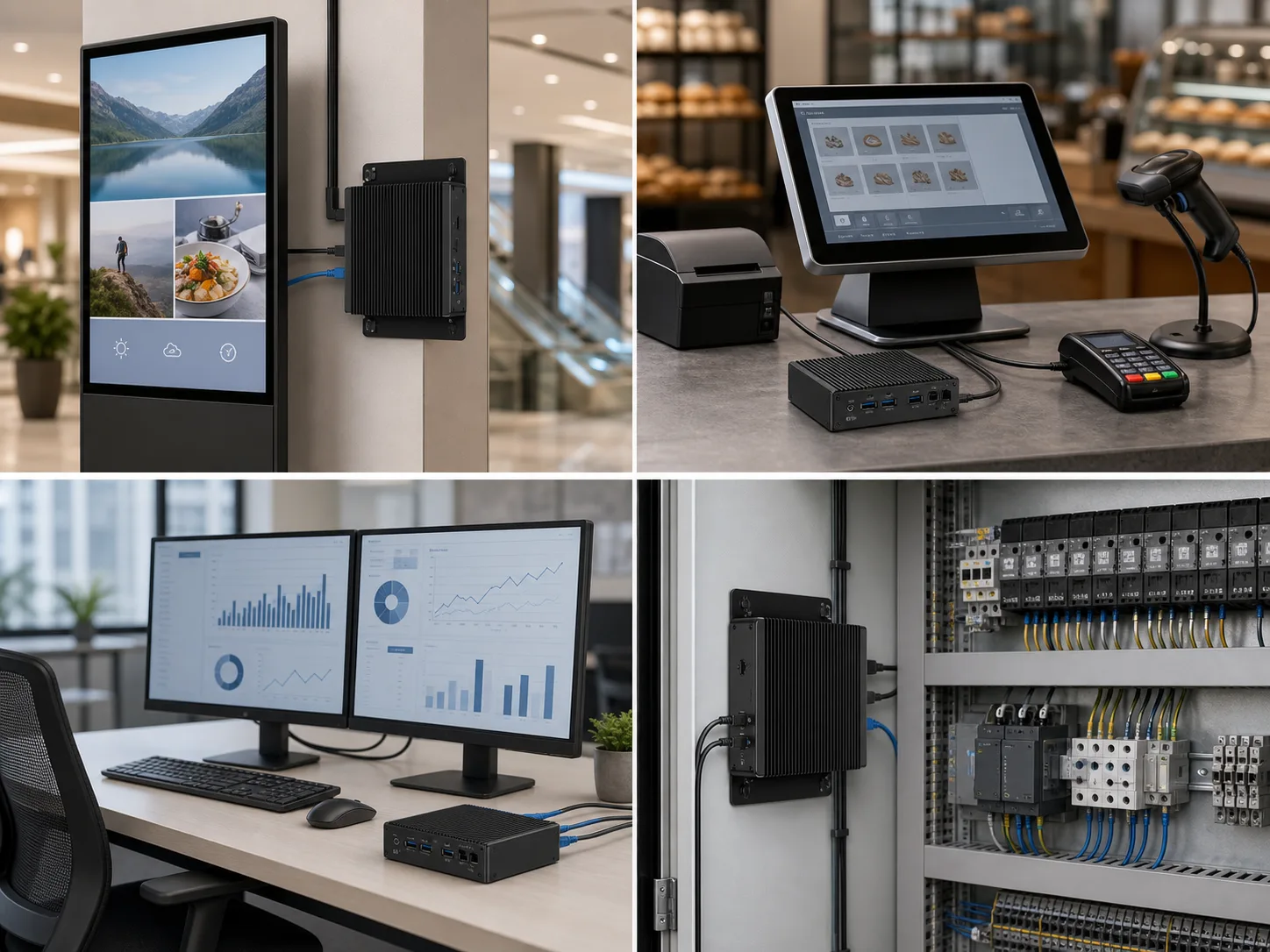
Different deployments need different display outputs, peripheral ports, network setup, mounting, and thermal expectations.
Digital Signage
Requirements:
- 24/7 operation reliability
- Fanless preferred (noise-free)
- Remote management capability
- HDMI/DP output for displays
Recommended specs:
- Intel N100/N200 or Core i3
- 8GB RAM
- 128-256GB SSD
- Fanless design
- VESA mount included
Volume: High (often 100-1,000+ units per deployment)
Point of Sale (POS)
Requirements:
- Compact footprint
- Multiple USB for peripherals
- Serial port for legacy devices
- Reliable operation
Recommended specs:
- Intel Core i3/i5
- 8-16GB RAM
- 256GB SSD
- Serial port, multiple USB
- WiFi + Ethernet
Volume: Medium-high (10-500 units per chain)
Office Productivity
Requirements:
- Full Windows 11 Pro support
- Video conferencing capable
- Dual monitor support
- Enterprise management (vPro)
Recommended specs:
- Intel Core i5 vPro
- 16GB RAM (upgradeable)
- 512GB NVMe SSD
- Dual display output
- WiFi 6 + Gigabit Ethernet
Volume: Medium-high (50-5,000 units per organization)
Healthcare
Requirements:
- Fanless (infection control)
- Medical-grade certifications
- Easy to sanitize
- HIPAA-compliant security
Recommended specs:
- Intel Core i5
- 16GB RAM
- 256-512GB SSD
- Fanless, sealed design
- TPM 2.0 for security
Volume: Medium (20-500 units per facility)
Education
Requirements:
- Durability
- Easy deployment
- Cost-effective
- Centralized management
Recommended specs:
- Intel Core i3/i5
- 8-16GB RAM
- 256GB SSD
- VESA mountable
- Remote management
Volume: High (100-10,000 units per district)
Industrial/Manufacturing
Requirements:
- Extended temperature range
- Vibration resistance
- Legacy port support
- Long product lifecycle
Recommended specs:
- Industrial-grade CPU
- 8-16GB RAM
- Industrial SSD
- Serial/GPIO ports
- Fanless, rugged design
Volume: Low-medium (10-200 units per facility)
Gaming/Entertainment
Requirements:
- Dedicated GPU or powerful iGPU
- High-speed storage
- Adequate cooling
- Multiple display support
Recommended specs:
- Intel Core i7/i9 or AMD Ryzen 7
- 32GB RAM
- 1TB NVMe Gen4
- Discrete GPU option
- Active cooling
Volume: Low-medium (varies widely)
B2B Wholesale Pricing Guide {#wholesale-pricing}
Pricing Tiers by Volume
Understanding wholesale pricing helps you plan procurement budgets and negotiate effectively.
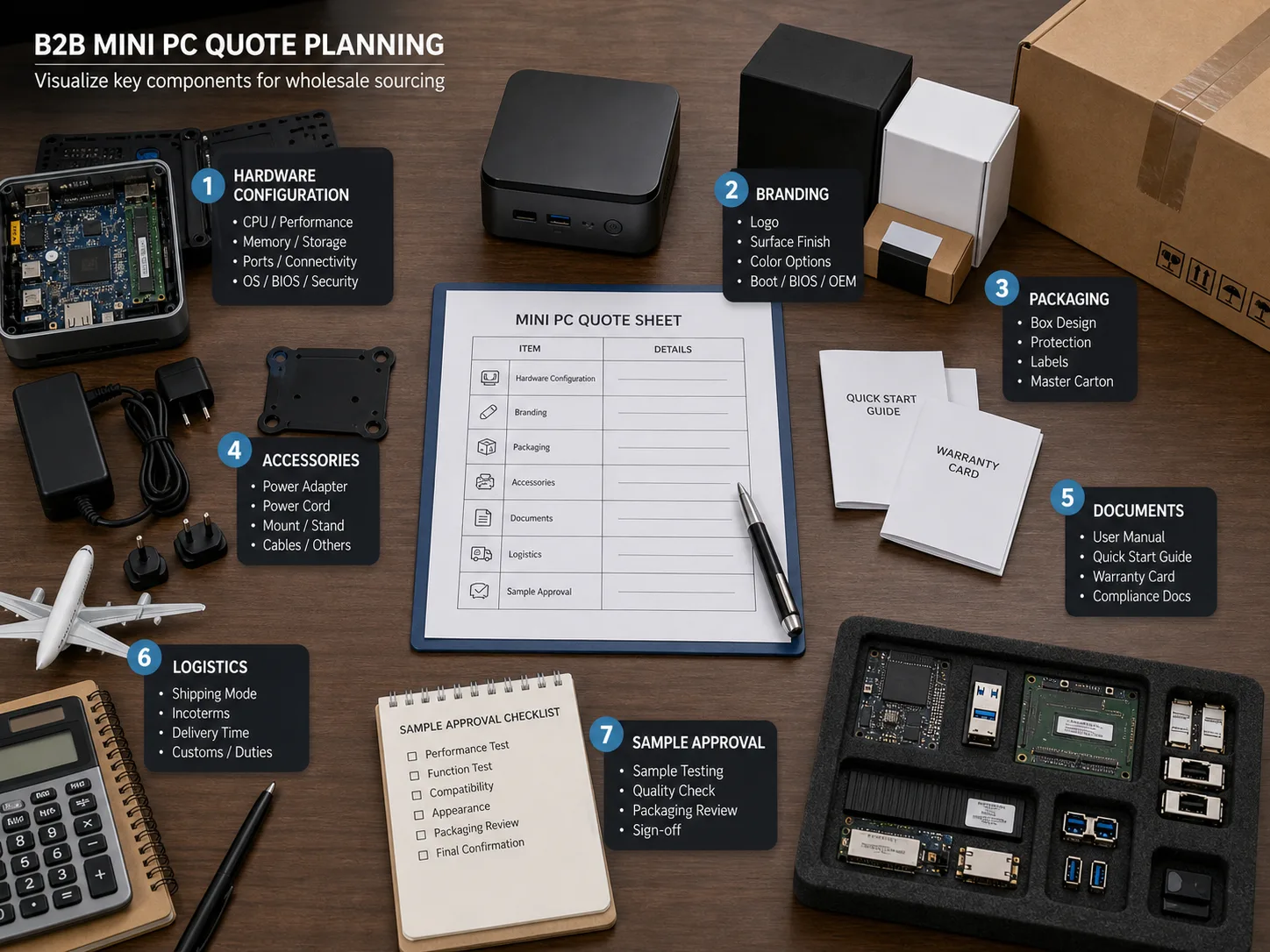
A useful quote should separate hardware configuration, branding, packaging, accessories, documents, logistics, and sample approval.
Example: Mainstream Mini PC (Core i5, 16GB, 512GB)
| Order Quantity | Unit Price (FOB) | Discount vs. Retail |
|---|---|---|
| 1-9 units | $480-520 | 0% (sample pricing) |
| 10-49 units | $420-450 | 10-15% |
| 50-99 units | $380-410 | 18-22% |
| 100-299 units | $350-380 | 25-30% |
| 300-499 units | $320-350 | 32-35% |
| 500-999 units | $300-330 | 35-40% |
| 1,000+ units | $280-310 | 40-45% |
Prices are indicative FOB China. Actual pricing varies by specifications and manufacturer.
Cost Components Breakdown
| Component | % of Total Cost | Notes |
|---|---|---|
| CPU | 25-35% | Largest single cost |
| Memory | 10-15% | Fluctuates with market |
| Storage | 8-12% | SSD prices declining |
| Motherboard | 15-20% | Includes chipset |
| Chassis/cooling | 8-12% | Higher for fanless |
| Power supply | 3-5% | External adapter typical |
| Assembly/testing | 5-8% | Labor and QC |
| Packaging | 2-3% | Standard packaging |
| Manufacturer margin | 8-15% | Varies by volume |
MOQ Expectations
| Customization Level | Typical MOQ | Negotiable To |
|---|---|---|
| Stock configuration | 10 units | 1 unit (samples) |
| Configuration selection | 50 units | 20 units |
| Basic branding | 100 units | 50 units |
| Custom BIOS/software | 200 units | 100 units |
| Hardware modification | 500 units | 300 units |
| Full custom design | 3,000+ units | 1,000 units |
Additional Costs to Consider
One-time costs:
- Tooling (custom chassis): $20,000-100,000
- Certification (CE/FCC): $3,000-8,000
- Custom packaging design: $500-2,000
- BIOS customization: $1,000-5,000
Per-unit costs:
- Shipping (sea freight): $8-15/unit
- Shipping (air freight): $25-50/unit
- Import duties: 0-5% (varies by country)
- Extended warranty: $10-30/unit
Payment Terms
Standard terms for new customers:
- 30% deposit on order confirmation
- 70% before shipment (T/T)
Established relationships:
- Net 30 or Net 60 terms
- Letter of Credit (L/C)
- Open account for large buyers
Customization Options {#customization}
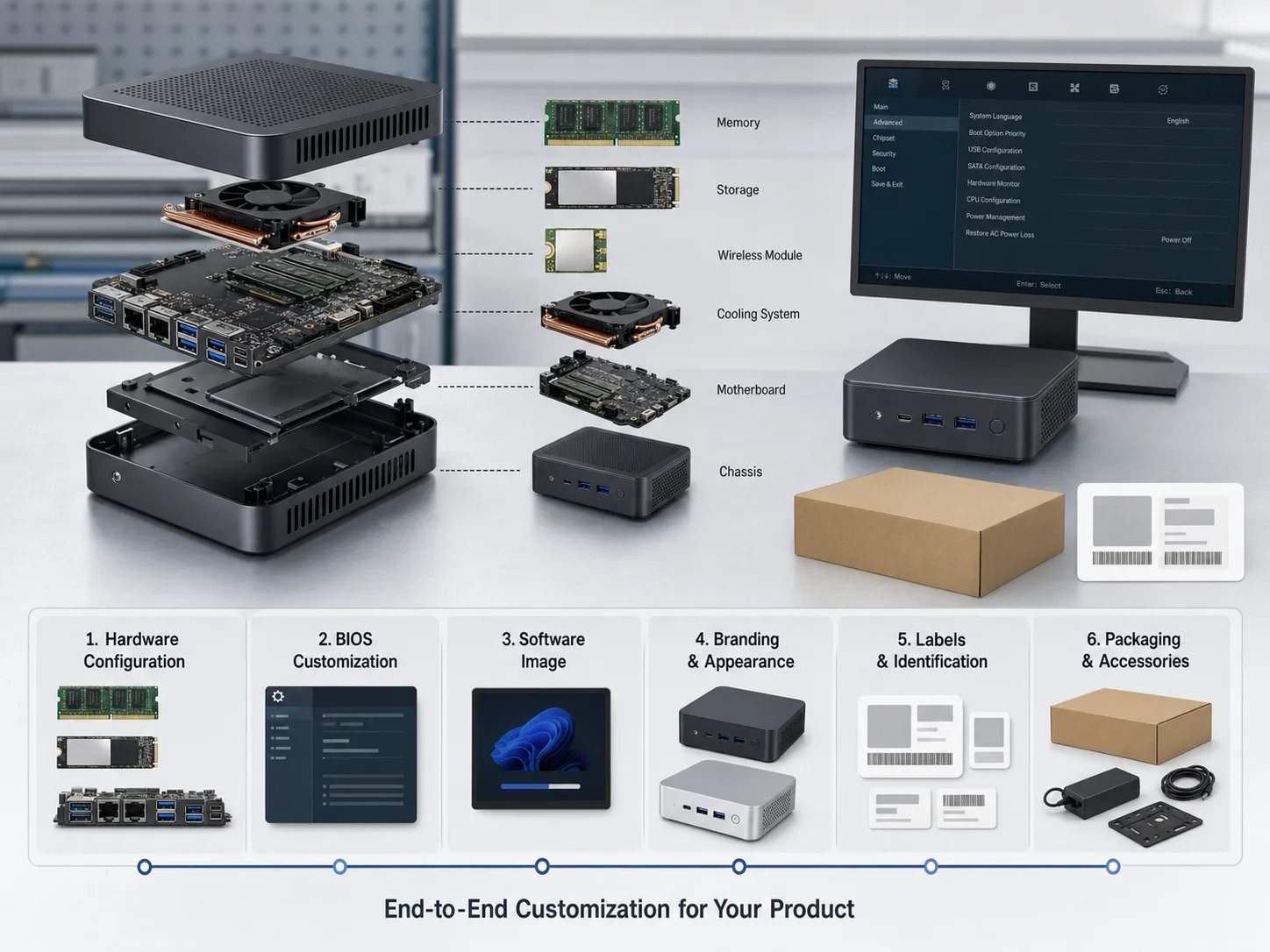
Mini PC customization can include hardware configuration, BIOS settings, software image, branding, labels, packaging, and accessories.
Hardware Customization
Configuration options (low MOQ):
- CPU selection within platform
- RAM capacity (8/16/32/64GB)
- Storage type and capacity
- WiFi/Bluetooth inclusion
- Port configuration
Hardware modifications (medium MOQ):
- Custom port layout
- Additional expansion slots
- Modified cooling solution
- Custom color options
- Industrial-grade components
Full custom design (high MOQ):
- Unique chassis design
- Custom motherboard
- Proprietary features
- Complete IP ownership
Software Customization
BIOS customization:
- Custom boot logo
- Modified boot sequence
- Locked settings for security
- Custom system information
Operating system:
- Windows 11 Pro/Home pre-installed
- Windows activation
- FreeDOS (no OS)
- Linux distributions
Pre-installed software:
- Productivity suites
- Security software
- Management agents
- Industry-specific applications
Branding Options
Physical branding:
- Logo on chassis (printing, laser etching)
- Custom color/finish
- Branded packaging
- Custom accessories
Digital branding:
- Boot splash screen
- Desktop wallpaper
- System information branding
- Custom recovery partition
Customization Timeline
| Customization Type | Additional Lead Time |
|---|---|
| Configuration only | 0 days |
| Basic branding | 3-5 days |
| BIOS customization | 5-10 days |
| Software pre-load | 2-3 days |
| Hardware modification | 2-4 weeks |
| Custom chassis | 8-16 weeks |
Choosing a Mini PC Manufacturer {#choosing-manufacturer}
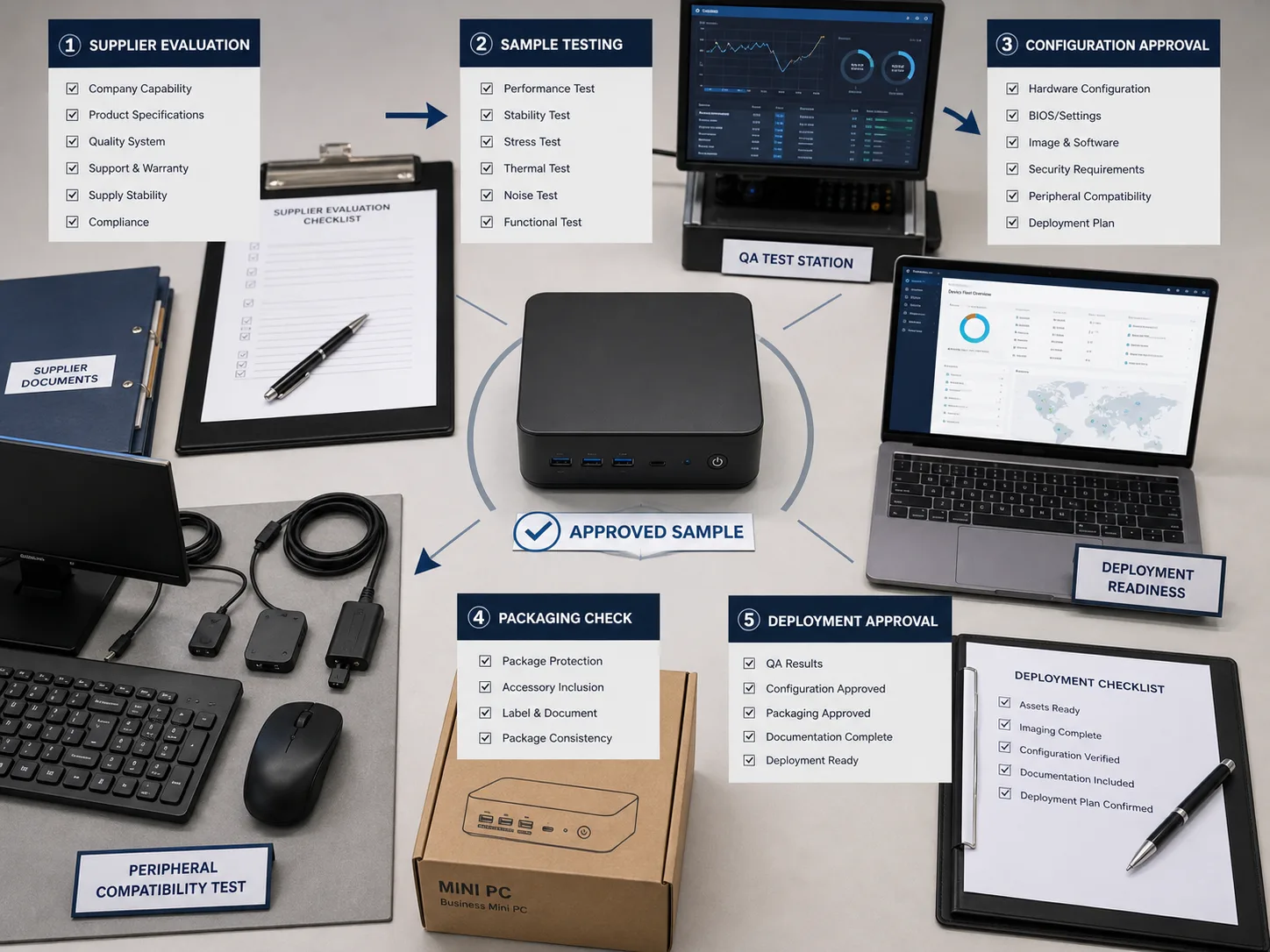
Supplier evaluation should connect capability review, sample testing, configuration approval, packaging check, and deployment readiness.
Manufacturer Tiers
| Tier | Examples | MOQ | Best For |
|---|---|---|---|
| Tier 1 OEMs | Intel, HP, Dell | 10,000+ | Major enterprises |
| Tier 2 ODMs | Regional brands | 1,000-5,000 | Mid-size distributors |
| Tier 3 Flexible | AIERXUAN | 50-1,000 | SMBs, startups, resellers |
| Trading companies | Various | 10-100 | Very small orders |
Evaluation Criteria
1. Manufacturing Capabilities
- Production capacity (units/month)
- Quality certifications (ISO 9001)
- Technology partnerships (Intel, AMD)
- R&D capabilities
2. Product Quality
- Component sourcing (genuine parts)
- Quality control processes
- Defect rates (ask for data)
- Reliability testing
3. Flexibility
- MOQ requirements
- Customization options
- Lead time flexibility
- Payment terms
4. Support & Communication
- English proficiency
- Response time
- Technical support
- After-sales service
Questions to Ask Manufacturers
- What is your minimum order quantity for branded mini PCs?
- Can you provide references from similar B2B clients?
- What certifications do your products carry (CE, FCC, RoHS)?
- What is your typical defect rate and warranty policy?
- Can I visit your factory or arrange a virtual tour?
- What is your production capacity and current lead time?
- How do you handle component shortages?
- What customization options are available at my volume?
Red Flags to Avoid
⚠️ Warning signs:
- No factory visit option (virtual or in-person)
- Unwilling to provide client references
- Prices significantly below market (quality concerns)
- Poor communication during inquiry phase
- No quality certifications
- Requests 100% payment upfront
- Vague specifications or capabilities
Certification Requirements
Essential certifications:
- CE marking: Required for European market
- FCC: Required for US market
- RoHS: Hazardous substances compliance
- ISO 9001: Quality management system
Optional but valuable:
- ENERGY STAR: Energy efficiency
- EPEAT: Environmental performance
- UL/CSA: Safety certification
- Medical certifications: For healthcare applications
Enterprise Deployment Guide {#enterprise-deployment}
Pre-Deployment Planning
1. Requirements Assessment
- User workload analysis
- Application requirements
- Security requirements
- Management infrastructure
2. Pilot Program
- Test with 10-20 units
- Evaluate real-world performance
- Gather user feedback
- Identify deployment issues
3. Deployment Strategy
- Phased rollout vs. big bang
- User training requirements
- Support infrastructure
- Backup/recovery procedures
Configuration Management
Standardization benefits:
- Simplified support
- Bulk imaging
- Consistent user experience
- Easier inventory management
Recommended approach:
- Define 2-3 standard configurations
- Match to user personas (basic, standard, power)
- Document specifications clearly
- Maintain configuration database
Remote Management
Essential management features:
- Intel vPro/AMT for out-of-band management
- TPM 2.0 for security
- UEFI Secure Boot
- Remote wipe capability
Management tools:
- Microsoft Endpoint Manager (Intune)
- Intel Endpoint Management Assistant
- Third-party RMM solutions
- Custom MDM integration
Security Considerations
Hardware security:
- TPM 2.0 chip
- Secure Boot enabled
- BIOS password protection
- Physical security slot
Software security:
- BitLocker encryption
- Windows Defender
- Endpoint protection
- Regular patching
Deployment Checklist
Pre-deployment:
- Verify all units received and inspected
- Create master image
- Test image on sample units
- Prepare deployment documentation
- Train support staff
Deployment:
- Physical installation
- Network configuration
- Image deployment
- Application installation
- User account setup
Post-deployment:
- Verify functionality
- Register in asset management
- User orientation
- Document any issues
- Collect initial feedback
Mini PC vs Desktop: Business Comparison {#mini-pc-vs-desktop}
When to Choose Mini PC
✅ Choose mini PC when:
- Space is limited or premium
- Energy costs are a concern
- Quiet operation is required
- Frequent relocation needed
- Standard business applications
- Budget-conscious deployment
When to Choose Traditional Desktop
✅ Choose desktop when:
- Maximum performance required
- Extensive upgradeability needed
- Multiple expansion cards required
- Heavy GPU workloads
- Long-term single deployment
- Specialized hardware requirements
Total Cost of Ownership Comparison
100-unit deployment over 5 years:
| Cost Category | Mini PC | Traditional Desktop |
|---|---|---|
| Hardware cost | $45,000 | $65,000 |
| Energy (5 years) | $3,600 | $15,000 |
| Desk space value | $0 | $5,000* |
| Shipping/handling | $1,500 | $4,000 |
| Disposal cost | $500 | $1,500 |
| Total TCO | $50,600 | $90,500 |
*Estimated value of desk space saved
TCO savings with mini PC: 44%
Performance Comparison
| Workload | Mini PC Performance | Desktop Performance |
|---|---|---|
| Office productivity | 100% | 100% |
| Web browsing | 100% | 100% |
| Video conferencing | 100% | 100% |
| Light content creation | 90% | 100% |
| Heavy multitasking | 85% | 100% |
| 3D rendering | 60-70% | 100% |
| Gaming (high settings) | 50-70% | 100% |
Mini PC with comparable CPU; desktop advantage comes from better cooling and GPU options
Frequently Asked Questions {#faq}
What is the best mini PC for business use in 2025?
The best mini PC depends on your specific needs:
- Best overall: Intel Core i5-based mini PC with 16GB RAM, 512GB NVMe
- Best value: Intel N100-based for basic productivity
- Best performance: Intel Core i7/i9 or AMD Ryzen 7 for power users
- Best for signage: Fanless N100/N200 with 24/7 reliability
AIERXUAN offers customizable options across all categories with flexible MOQ from 50 units.
What is the minimum order quantity for wholesale mini PCs?
MOQ varies by manufacturer and customization level:
- Stock products: 10-50 units
- Configuration selection: 50-100 units
- Basic branding: 100-200 units
- Custom BIOS/software: 200-500 units
- Hardware modifications: 500-1,000 units
AIERXUAN offers flexible MOQ starting from 50 units for standard configurations with branding options.
How long does mini PC wholesale ordering take?
Typical timeline from order to delivery:
- Stock products: 1-2 weeks
- Configured orders: 2-3 weeks
- Branded orders: 3-4 weeks
- Custom orders: 4-8 weeks
Add 2-4 weeks for sea freight or 3-5 days for air freight.
Can I get mini PCs with my company branding?
Yes, branding options include:
Physical branding:
- Logo printing or laser etching on chassis
- Custom color options
- Branded packaging
Digital branding:
- Custom boot logo
- Desktop wallpaper
- System information branding
Minimum order for branding typically starts at 100 units.
What certifications should mini PCs have?
Essential certifications for commercial sale:
- CE marking: Required for European Union
- FCC: Required for United States
- RoHS: Environmental compliance (most markets)
- ISO 9001: Quality management (manufacturer)
Additional certifications may be required for specific industries (medical, industrial).
Are mini PCs reliable for 24/7 operation?
Yes, when properly specified:
- Choose fanless designs for maximum reliability
- Select industrial-grade components
- Ensure adequate ventilation
- Use quality power supplies
- Consider extended warranty options
Many mini PCs are designed specifically for 24/7 digital signage and kiosk applications.
How do mini PCs compare to laptops for business?
| Factor | Mini PC | Laptop |
|---|---|---|
| Portability | Stationary | Mobile |
| Display | External required | Built-in |
| Keyboard/mouse | External required | Built-in |
| Upgradeability | Better | Limited |
| Price (same specs) | 20-30% lower | Higher |
| Battery | None | Built-in |
Choose mini PC for fixed workstations; choose laptop for mobile workers.
Can I install Linux on mini PCs?
Yes, most mini PCs support Linux:
- Ubuntu, Fedora, and other major distributions
- Check driver compatibility before ordering
- Some manufacturers offer Linux pre-installed
- FreeDOS option allows custom OS installation
Verify specific model compatibility with your preferred distribution.
Key Takeaways
- Match specifications to use case: Don't overspend on performance you don't need
- Consider total cost of ownership: Mini PCs offer 25-40% TCO savings over desktops
- Start with pilot orders: Test before committing to large volumes
- Verify certifications: Ensure products meet your market requirements
- Evaluate manufacturers thoroughly: Quality and support matter as much as price
- Plan for deployment: Standardization and management tools simplify large rollouts
- Consider customization: Branding and configuration options add value
Ready to Source Mini PCs for Your Business?
Whether you need 50 units for a pilot program or 5,000 units for enterprise deployment, finding the right mini PC partner is crucial for success.
Why Choose AIERXUAN for Mini PC Wholesale?
✅ Flexible MOQ: Start with just 50 units
✅ Fast Delivery: 7-15 days production for standard configs
✅ Full Customization: Hardware, BIOS, branding, packaging
✅ Quality Assured: ISO 9001 certified, <0.5% defect rate
✅ Intel Partner: Direct component access, competitive pricing
✅ Experienced Team: 12+ years, 500+ B2B clients worldwide
Product Range
Ultra-Compact Series (N100/N200)
- Fanless options available
- Perfect for signage and kiosks
- Starting from $150/unit (volume pricing)
Business Series (Core i3/i5/i7)
- Full productivity performance
- vPro options for enterprise
- Starting from $280/unit (volume pricing)
Performance Series (Core i7/i9)
- Workstation-class performance
- Discrete GPU options
- Starting from $550/unit (volume pricing)
Your Next Steps
1. Define Your Requirements
Determine your use case, volume, and specifications needed.
2. Request a Quotation
[📧 Email us](/en/contact#rfq PC Wholesale Inquiry) with your requirements for a detailed quote within 24 hours.
3. Order Samples
Start with 1-5 sample units to evaluate quality and performance.
4. Place Your Order
Enjoy competitive pricing, reliable quality, and on-time delivery.
Contact Information
AIERXUAN Electronics Manufacturing
📧 Email: AIERXUAN sales team
📞 WhatsApp: +86 138 2355 5906
🌐 Website: www.aierxuanlaptop.com
🏭 Factory: Shenzhen, China
ISO 9001/14001 Certified | Intel Technology Partner
Related Articles
-
Custom Mini PC OEM/ODM Procurement Checklist - Prepare RFQ requirements for use case, ports, OS image, samples, documents, and branding
-
OEM vs ODM Manufacturing: Complete Guide for Tech Brands 2025 - Understand manufacturing models
-
Custom Laptop Manufacturing: Complete Guide for Brands 2025 - Laptop manufacturing process
-
Mini PC Wholesale: B2B Pricing & MOQ Guide - Detailed pricing guide
Article Information:
- Published: January 14, 2026
- Category: Mini PC, B2B Wholesale
- Tags: Mini PC, Best Mini PC, Wholesale, B2B, Enterprise, Digital Signage
- Word Count: 4,200 words
Sources: IDC Worldwide PC Tracker 2024, Gartner Market Analysis, AIERXUAN Production Data 2024-2025

Bowen Yang
Sales Manager at AIERXUAN
Bowen works with overseas distributors, education buyers, and private-label hardware teams on laptop and Mini PC sourcing. He focuses on practical OEM/ODM requirements, sample confirmation, lead time, configuration options, and factory-direct communication.
View Author Profile →